
Homeowners, renters, and families

The Home Inventory App for Everything You Own

Know what you own, where it is, what it is worth, and everything worth remembering about it. Itemtopia gives every room, belonging, receipt, warranty, photo, document, repair, and important detail one private, searchable home.

What makes Itemtopia a complete home inventory app?

Itemtopia is a complete home and personal inventory app for organizing belongings and preparing for insurance. Unlike a spreadsheet or folder of photos, Itemtopia connects each item to its room, photos, receipt, warranty, serial number, value, documents, service history, reminders, and the people who need access.

100+ countriesUsed by people around the world
12 languagesBuilt for international homes and families
30+ yearsAsset management experience behind the product
Offline accessUseful even when the internet is not
Your belongings, documents, and knowledge

One place for the whole story of everything you own.

A useful inventory is more than a list. Itemtopia keeps the item, its location, proof of ownership, documents, maintenance, useful knowledge, and history together so the answer is there when real life asks for it.

Itemtopia grew from more than 30 years of asset-management experience, bringing capabilities once built for global organizations to homeowners, renters, families, and collectors.
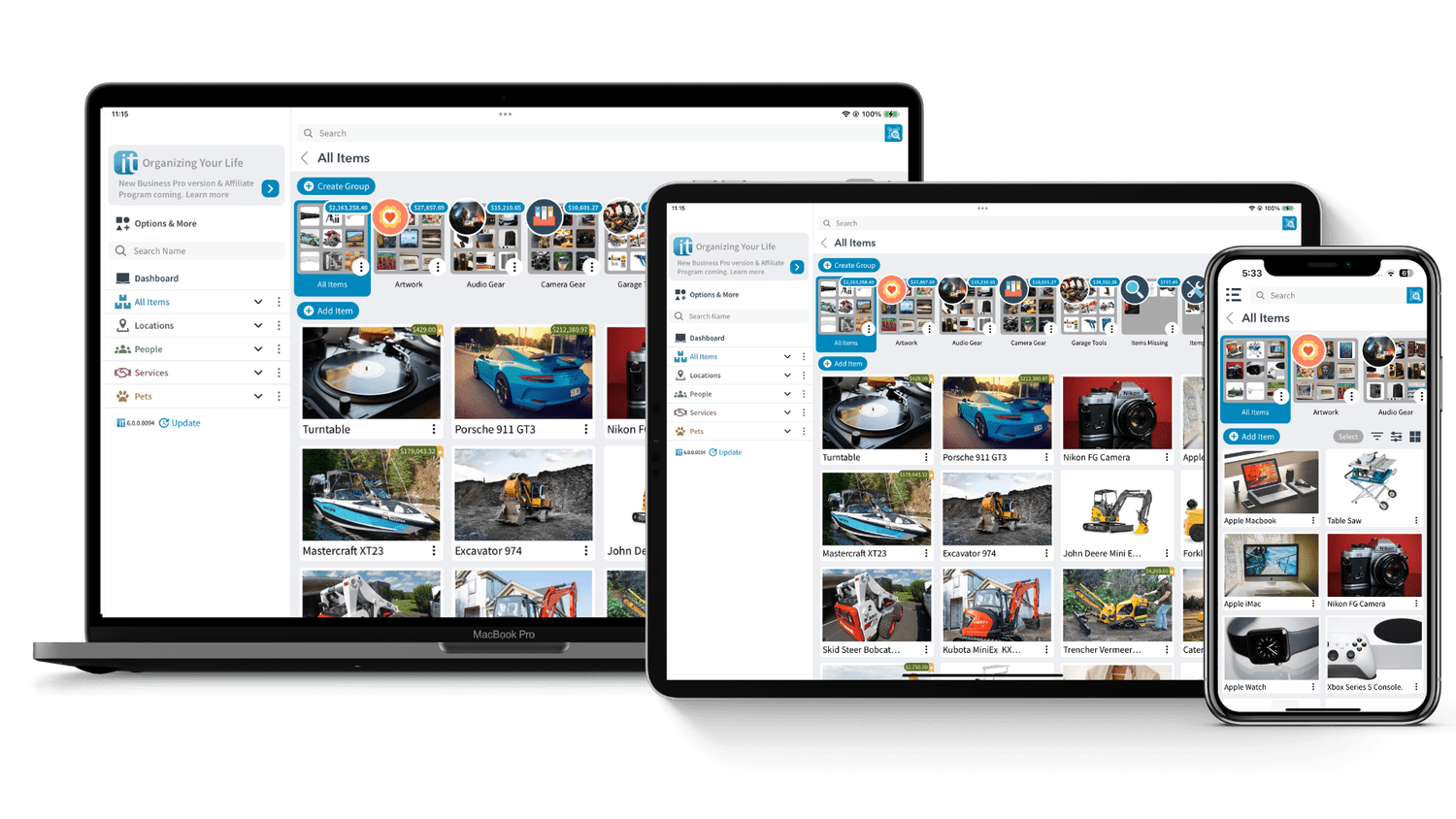
Itemtopia home inventory displayed across computer, tablet, and phone screens

A complete record of your home

Organize homes, rooms, storage spaces, belongings, appliances, electronics, furniture, tools, valuables, collections, vehicles, documents, and anything else you own.

Proof when details matter

Keep photos, receipts, serial numbers, model numbers, appraisals, values, manuals, warranties, and insurance documents connected to the exact item they describe.

Knowledge that stays with the item

Save repair notes, setup instructions, service history, replacement parts, reminders, web links, videos, and the useful details you would otherwise have to rediscover.

Made for real homes and real life

Why homeowners choose Itemtopia

Use it as a household inventory, an insurance record, a warranty organizer, a maintenance memory, a collection catalogue, or all of them at once.

Room-by-room inventory

Build a living record of every home, room, closet, garage, storage unit, cottage, or other space.

Insurance-ready documentation

Capture proof of ownership before a fire, flood, theft, storm, or other loss makes details difficult to remember.

Receipts and warranties

Keep purchase proof, coverage dates, manuals, and service documents with the item instead of in a paper pile.

Repairs and maintenance

Remember service dates, technician advice, parts, settings, costs, and what needs attention next.

Collections and valuables

Document provenance, appraisals, values, serial numbers, storage, loans, and the stories behind important objects.

Private sharing

Give family, clients, advisors, or buyers access to selected information without exposing your entire inventory.

A practical room-by-room inventory

What should you include in a home inventory?

Start with anything expensive, difficult to replace, important to insure, or easy to forget. You do not need to finish the whole house in one day.

01

Living room and bedrooms

Furniture, art, rugs, televisions, audio equipment, jewelry, clothing, and personal valuables.

02

Kitchen and laundry

Appliances, model and serial numbers, receipts, warranties, manuals, filters, parts, and repair history.

03

Office and electronics

Computers, phones, tablets, cameras, networking equipment, software details, accessories, and purchase records.

04

Garage, workshop, and outdoors

Tools, bicycles, lawn equipment, generators, sports gear, camping equipment, boats, and seasonal items.

05

Collections and high-value assets

Art, watches, wine, coins, stamps, memorabilia, instruments, antiques, and appraised belongings.

06

Documents and household systems

Insurance policies, keys, alarm details, HVAC, water heaters, contractors, maintenance notes, and emergency information.

Useful before and after the unexpected

Home inventory for insurance, moving, repairs, and everyday questions

Insurance and disaster recovery

A room-by-room inventory helps you remember what existed and locate proof when speaking with insurers, adjusters, family members, or recovery professionals.

Moving and storage

Know what was packed, where it went, which box or storage space holds it, and whether anything is missing or damaged.

Repairs and warranty claims

Find the receipt, model number, warranty, manual, service history, and notes while you are speaking with a store or technician.

Estate and family planning

Create a clearer record of household contents, valuables, documents, items to transfer, donations, and belongings that may eventually be sold.

Everyday household memory

Find the spare part, remember a setting, check who borrowed something, or answer the question: where did we put that?

Selling and sharing

Create selected web pages for individual items, collections, garage sales, or estate sales, with control over which details are public.

Purpose-built personal inventory software

Itemtopia compared with spreadsheets and photo folders

Spreadsheets and cloud folders can store fragments. Itemtopia is designed to preserve the relationships between your belongings and everything you know about them.

NeedSpreadsheet or photo folderItemtopia
OrganizationRows, columns, and separate foldersItems connected to homes, rooms, collections, people, and documents
ProofLinks or files stored somewhere elsePhotos, receipts, warranties, values, and serial numbers attached to the item
HistoryUsually overwritten or added as notesService, repairs, reminders, costs, and knowledge kept over time
AccessDepends on the file and connectionMobile, desktop, web, and useful offline access
SharingOften the entire file or folderShare selected items and selected information
QuestionsSearch the sheet manuallySearch your inventory and ask AI about your specific items
A home inventory you can actually finish

How to create your home inventory

Begin with the most important room or belongings. A focused half hour is more valuable than waiting for a perfect weekend that never arrives.

  1. 1

    Start with one room

    Choose the kitchen, living room, garage, or whichever space contains the belongings you most want documented.

  2. 2

    Photograph what matters

    Take room overviews and clear item photos. Add close-ups of labels, serial numbers, model numbers, and identifying details.

  3. 3

    Attach proof

    Add receipts, warranties, appraisals, manuals, values, purchase dates, and insurance documents when you have them.

  4. 4

    Save useful knowledge

    Record maintenance, repair advice, settings, parts, videos, web links, and reminders while the information is fresh.

  5. 5

    Keep it alive

    Add new purchases and update important records over time. A useful inventory grows with your home instead of becoming a one-time project.

Detailed home inventory guidance

Helpful next steps for protecting and organizing your home

These practical guides answer the questions people commonly have while creating an inventory, preparing for insurance, and documenting valuable belongings.

How to Create a Home InventoryHome Inventory Checklist for Every RoomWhat to Include for InsuranceHow to Document ValuablesTrack Receipts and Warranties DigitallyBuild a Disaster Recovery File
See all Itemtopia guides
Clear answers before you begin

Home inventory app questions

What homeowners, renters, families, and collectors want to know before choosing a personal inventory app.

What is a home inventory app?

A home inventory app is a digital record of the belongings in your home. It can organize items by room or category and keep photos, receipts, warranties, serial numbers, values, documents, and other proof connected to each item.

What is the best home inventory app?

The best home inventory app is one you can keep using as your home changes. It should be easy to search, work across devices, organize items by room, store proof of ownership, support insurance records, and keep useful history with each item. Itemtopia is designed around all of those needs.

What should I include in a home inventory?

Start with appliances, electronics, furniture, tools, jewelry, art, cameras, musical instruments, sports equipment, collections, and other items that would be expensive or difficult to replace. Add photos, descriptions, serial numbers, receipts, values, and supporting documents when available.

Can Itemtopia help with a home insurance claim?

Yes. Itemtopia can help you prepare a clearer record for insurance conversations by keeping room photos, item photos, receipts, values, serial numbers, appraisals, and documents organized before a loss occurs. Your insurer decides what documentation is required for a claim.

Does Itemtopia work for renters?

Yes. Renters also need a record of furniture, electronics, clothing, valuables, tools, bicycles, and other belongings for renters insurance, moving, theft, or disaster recovery.

Can I store receipts, warranties, and manuals?

Yes. Receipts, warranties, manuals, invoices, appraisals, photos, service records, and other files can remain attached to the item they belong to instead of being scattered across paper folders, email, and cloud storage.

Does Itemtopia work offline?

Itemtopia is designed to keep useful inventory information available offline, which matters at a cottage, repair shop, storage unit, job site, or during a disruption when internet access may be unreliable.

Can Itemtopia track collections and valuables?

Yes. Itemtopia can document art, jewelry, watches, cameras, wine, coins, stamps, memorabilia, tools, vehicles, and other collections with photos, provenance, values, appraisals, serial numbers, storage locations, and service history.

Is Itemtopia better than using a spreadsheet?

A spreadsheet can list items, but Itemtopia is built around the item itself. Photos, documents, people, rooms, receipts, warranties, reminders, repair history, and related records remain connected and searchable without maintaining a complicated file system.

Can I ask AI questions about my belongings?

Yes. Itemtopia can help answer questions about your items, including how to use or repair something, which parts may be available, what an item may be worth, and what information you have already saved about it.

Can I share selected items without sharing everything?

Yes. You can choose selected items and information to share with family, clients, buyers, advisors, or others. Itemtopia can also create shareable pages and micro websites for collections, estate sales, garage sales, or individual items.

Is my home inventory private and secure?

Itemtopia is private by default and encrypts your data. You decide what to share, which people should have access, and which selected item details may appear on a shareable page.

Which devices can I use Itemtopia on?

Itemtopia is available for iOS, Android, Mac, Windows, and the web. The Itemtopia Pro web app provides more room for reporting, advanced views, integrations, team workflows, and more powerful AI on larger screens.

Ready to know what you own?

Start with one room, one collection, or one item that would be hard to replace from memory.

Download Itemtopia